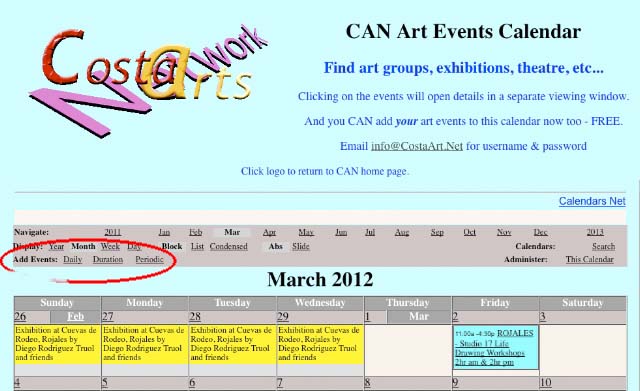
First select and click on Daily, Duration or Periodic - depending on if you're adding a on-off event or course of classes etc - where it says "Add Events:"
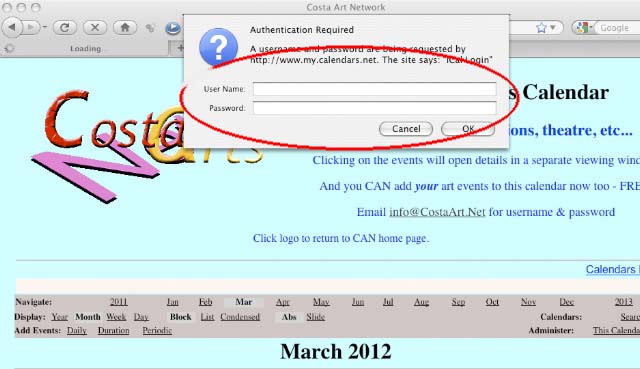
You will now be asked to fill in user name & password.
If you don't know these or have forgotten them, email me, Martin, for them at info@CostaArt.Net
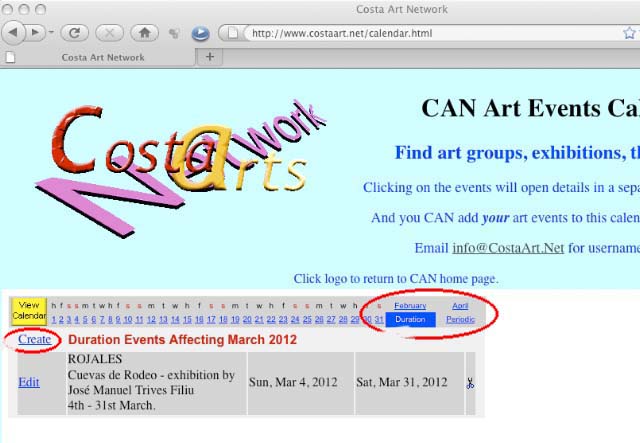
If you have made the wrong selection about duration etc,. you can alter that by clicking on the relevant word at the right of the dates - and alter month here too as required.
Then click on "Create"
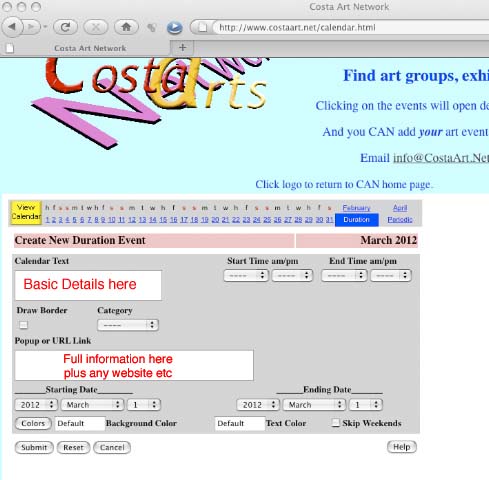
Now type the basic details of your event in the "Calendar Text" box.
This should include TOWN & title of event.
Now type as much as you want into the "Popup or URL Link" - e.g. costs, phone numbers, emails, etc & URL of any website that may be relevant.
Now enter the date(s) where asked and Start & End times - note 12 hour clock so you will need to select am or pm.
If you leave the background & text colours as default, your entry will be colour coded for classes, events, etc accordingly.
When you have completed it all, click "Submit".
N.B. You will NOT be able to edit it after submitting it!
(This is a safety feature to prevent others altering your postings.)
If you DO make an error, just email me, info@CostaArt.Net, with the corrections and I will do it.
It really isn't too difficult, but if I have to translate all emails, open doc file attachments, etc., etc., & then enter everyone's details, it takes a long time... - and remember I do all of this as a free service too!
Then every week I email the Press, artists, CAN members & other interested parties with the events listed on the calendar.